 Claimify
Customers file returns, exchanges, and warranty claims. You resolve them all from one dashboard.
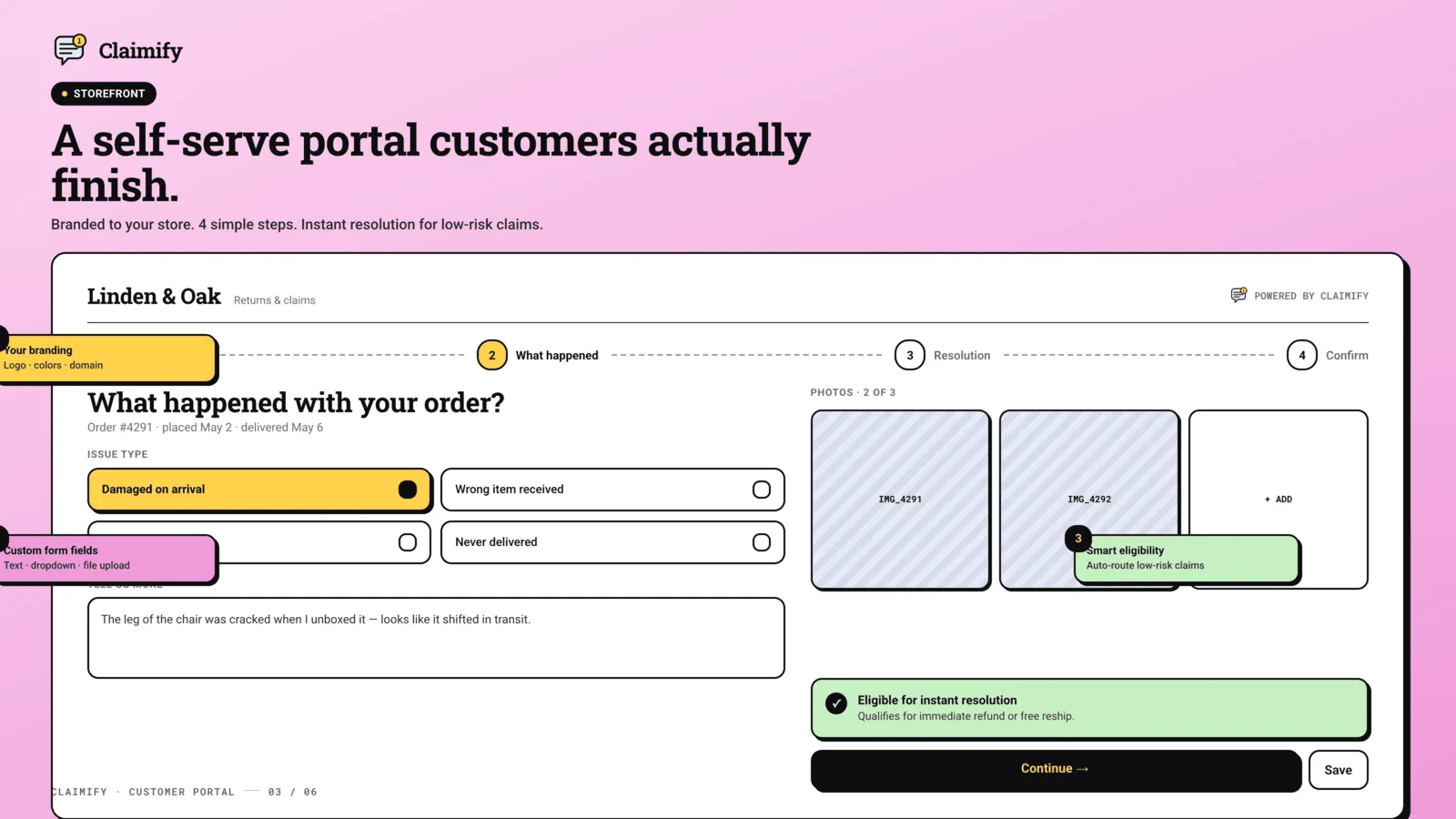
Claimify gives customers a branded self-service portal where they can request a return, refund, exchange, or warranty claim from their account or the order confirmation page. Every request lands on one dashboard as a card you can move through your own workflow. Set auto-approval rules so predictable requests resolve without you, build custom workflows for store credit or replacement orders, and use analytics to see which products and reasons generate the most claims.
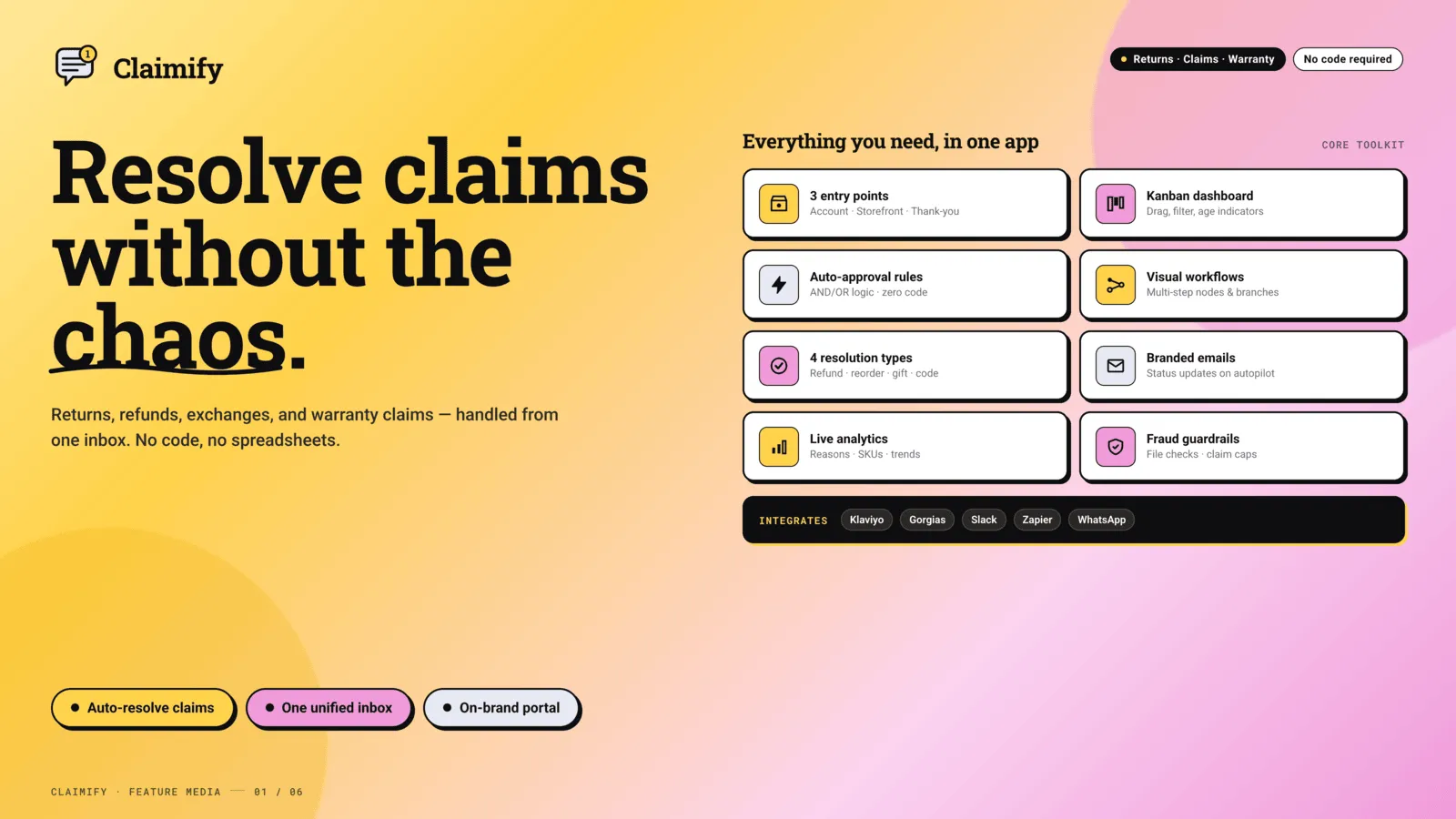
Everything you need
File from the customer account
Customers request a return, exchange, or warranty claim from their account or the order confirmation page.
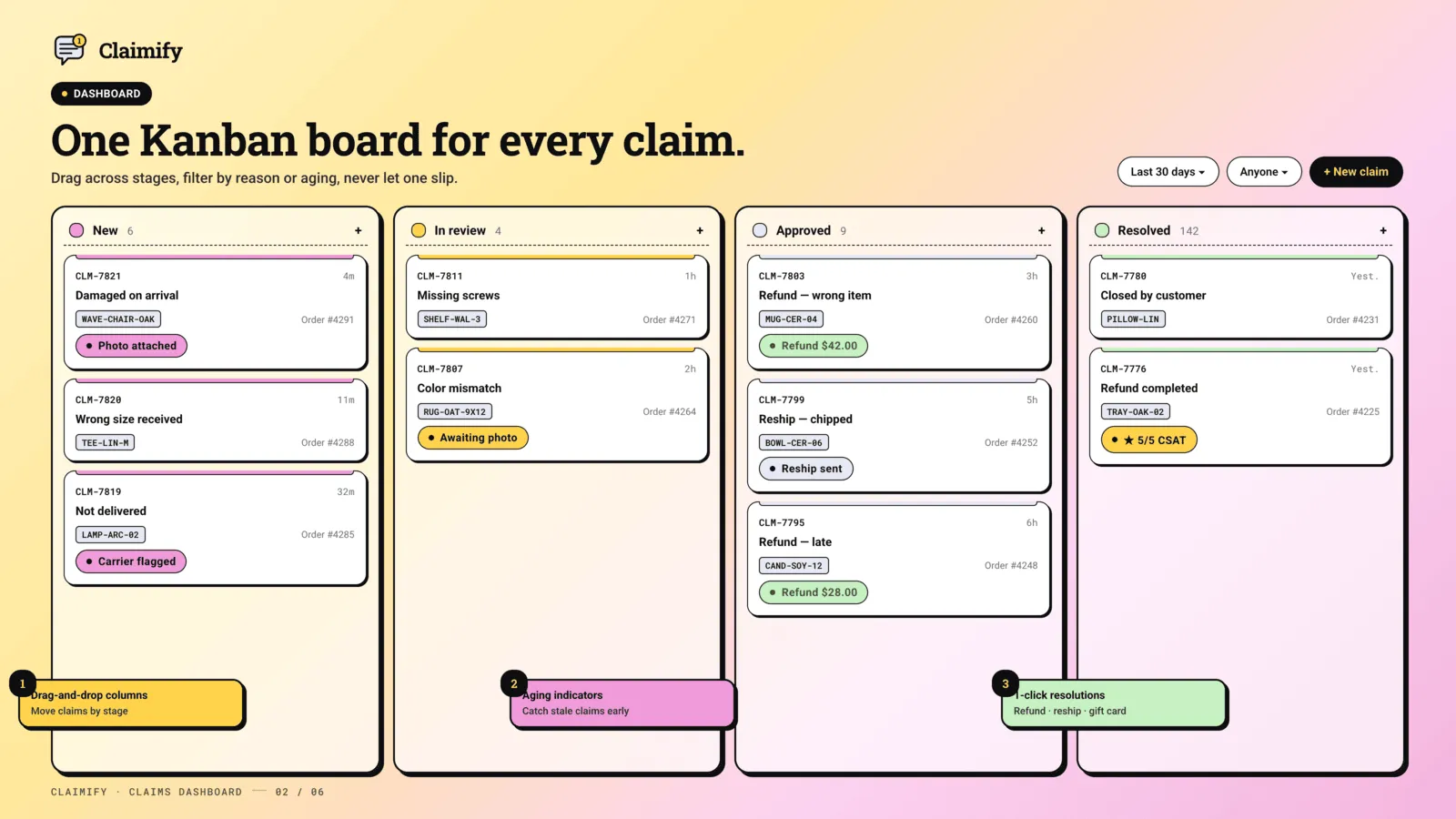
One claims dashboard
Every request lands as a card you move through your own workflow, from first look to resolution.
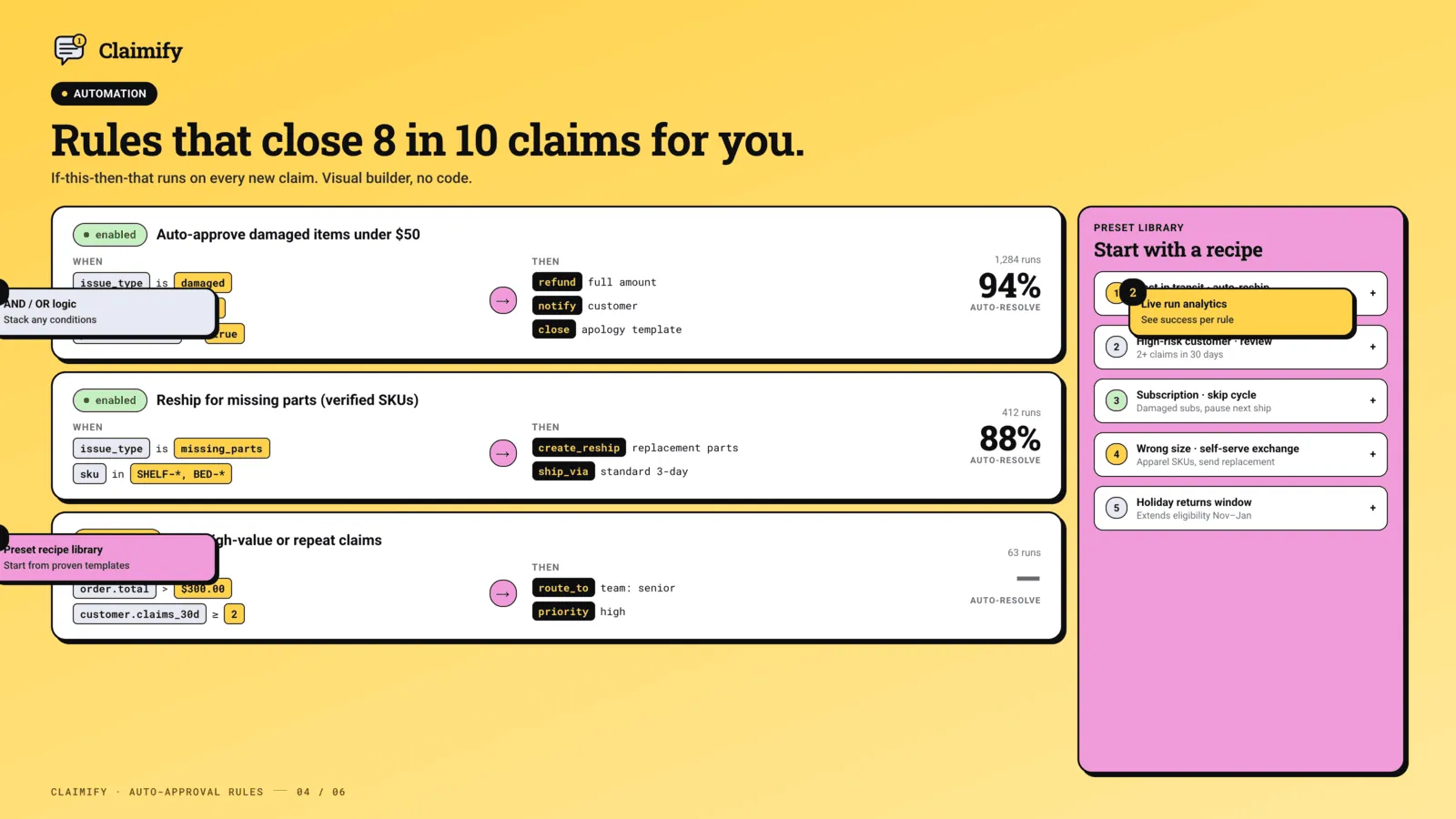
Auto-approval rules
Predictable requests resolve without you. Your team only handles the claims that need a person.
Workflows for the outcome
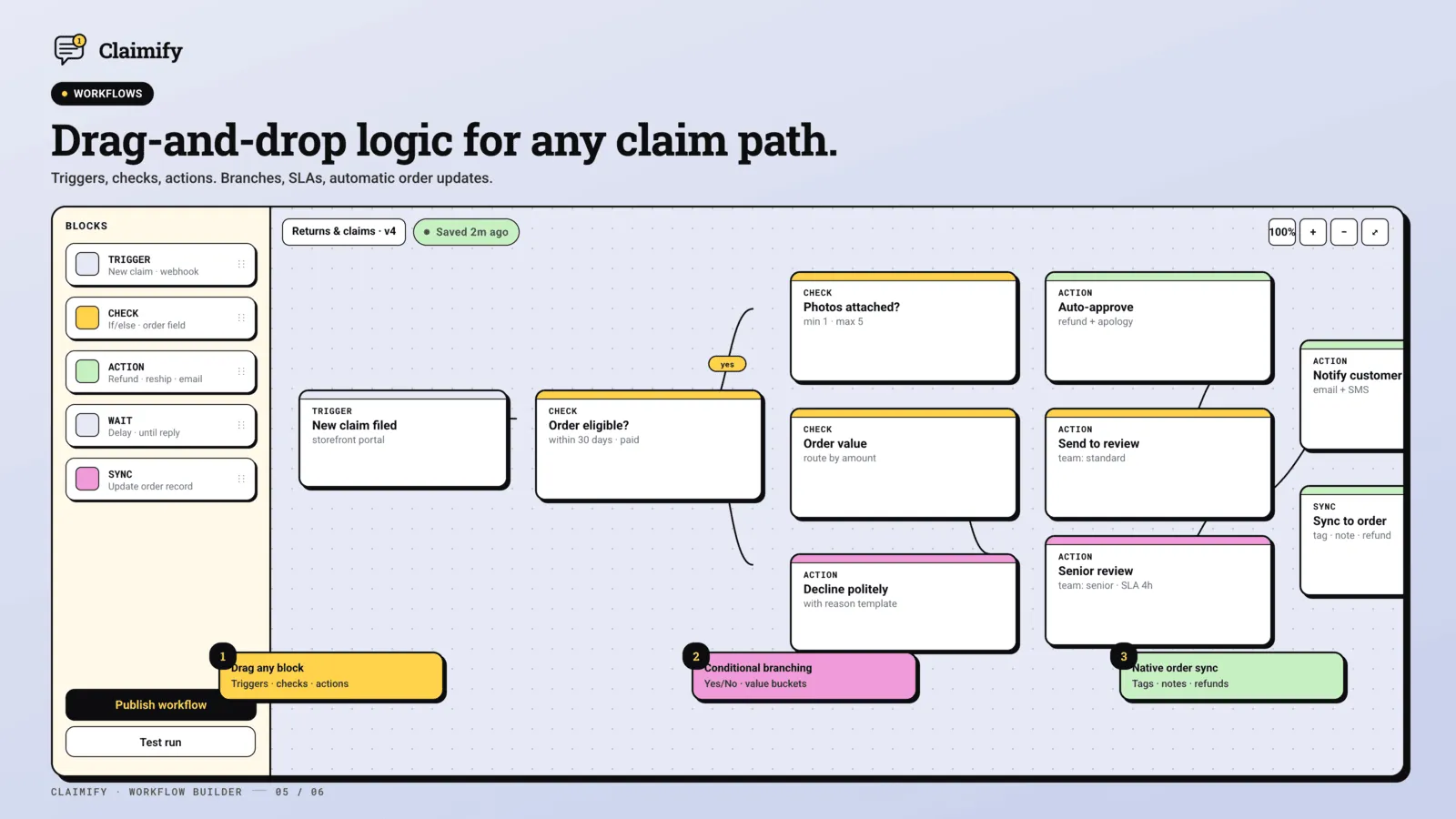
Build workflows for store credit, replacement orders, and RMA returns so the next step is already decided.
Claims analytics
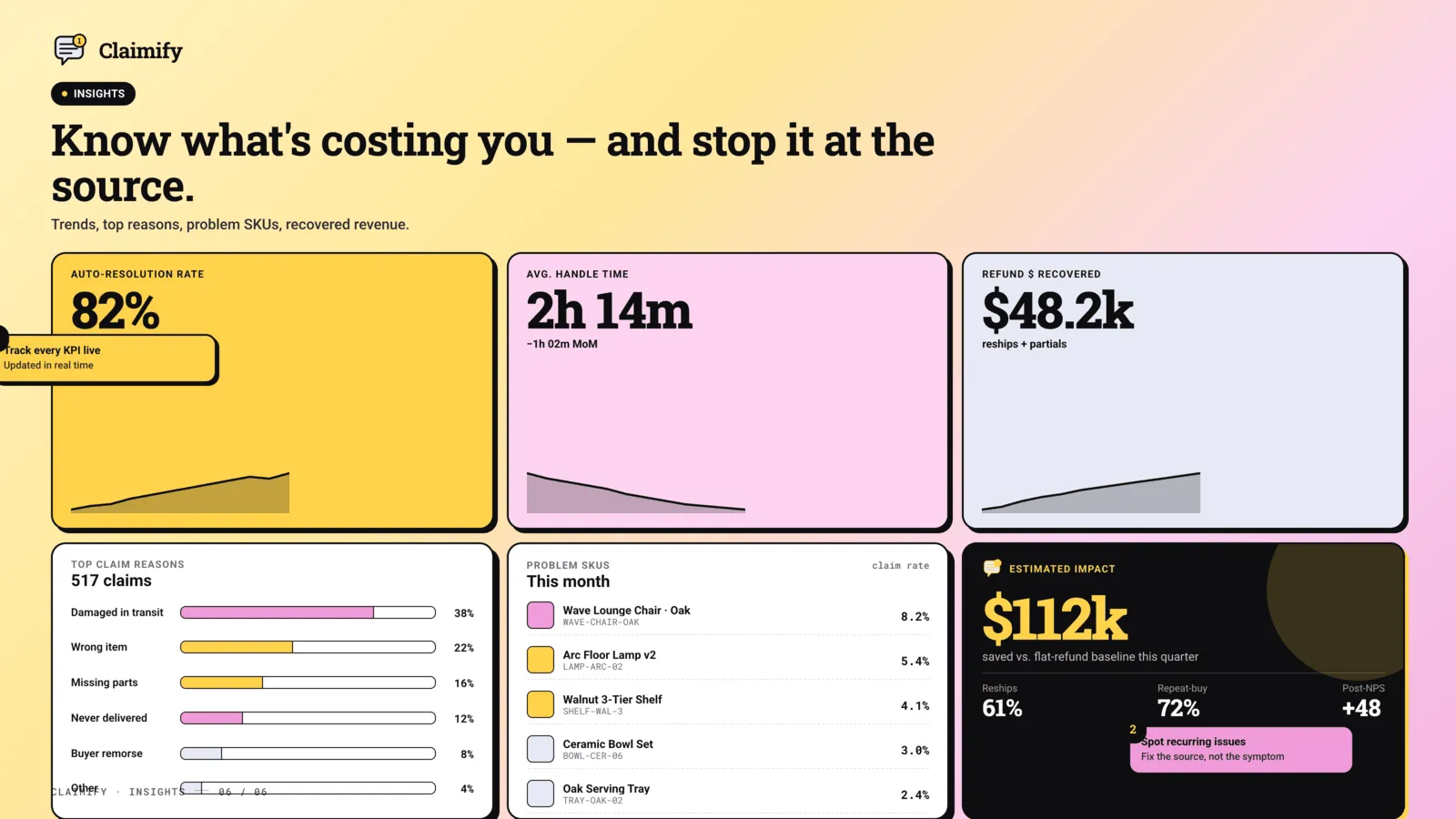
See which products and claim reasons come up most, and fix the pattern instead of the ticket.
Your brand on the portal
Custom branding is on Plus. Sending domain and custom domain settings are on Business.
See it in action
Loved by merchants
“What I appreciate most is how easy it was to get started—the setup was quick, and the dashboard is very intuitive. It automates the tedious parts of the workflow.”
“The team are extremely responsive, which is the main value for us in continuing to use the app. The platform itself is clear, intuitive, and easy to set up.”
“This is exactly what we were looking for. It's easy to use, and the customer support responds very quickly.”
Simple, transparent pricing
Basic
$9 /mo
- ✓ 1 claim form
- ✓ Basic validation rules
- ✓ Up to 3 claim reasons
- ✓ Standard email templates
- ✓ Email support
- ✓ 3-day free trial
Plus
Popular$19 /mo
- ✓ Unlimited claim forms
- ✓ Unlimited advanced validation rules
- ✓ Custom validation logic
- ✓ Smart auto-approval rules
- ✓ Custom branding
- ✓ Advanced analytics
- ✓ Priority support
- ✓ 3-day free trial
Business
$49 /mo
- ✓ Everything in Plus
- ✓ Workflows for any claim scenario
- ✓ Returns management
- ✓ Sending domain integration
- ✓ Custom domain settings
- ✓ Dedicated account manager
- ✓ Step-by-step warranty forms
- ✓ 3-day free trial
What changed
Changes that matter when you use Claimify. A new note is added when something is ready for your store.
The claim page follows the shopper's language
- The page where a shopper files a claim can follow their language.
Claims inside the customer account
- A signed-in customer can see their claims and file a new one from their account.
Three ways to file a claim
- File from an order, without an order, or from a spreadsheet.
- Map the columns yourself, preview the file, and attach each row to the real order and line item.
- A claim without an order can include photos and an answer for each product.
- A claim filed without an order is still checked against that form's rules.
Choose which products a claim may cover
- Limit a claim to products you pick, or to your vendors, product types, and tags, and see how many products that includes.
Help on the home page
- An assistant sits on the app home, so you can ask about the work in front of you.
- The bar at the bottom of the app shows whether the storefront form is turned on.
Vertical slide layout
- A claim form can be laid out as a vertical slide.
Claims that are not tied to one order
- A claim without an order can cover several products from your catalogue.
- Attach a customer to an order that has none, and see that customer on the claim.
Imports, rejection emails, and form answers
- Import existing open claims from a spreadsheet.
- Staff can file a claim with no order number.
- Each custom status can decide whether it emails the customer.
- A rejected claim has its own email.
- Emails can use a first name, an optional greeting, and a closing you write.
- An auto-approval rule can use the answers the form collected.
Help from the app
- The help menu opens Claimify's booking page and feedback form.
Branch on what the customer asked for
- The form can branch on the resolution the customer asked for, and that choice shows on the claim.
Unfinished claims and a readable timeline
- After an order lookup, offer an unfinished claim back to the customer.
- The customer's timeline shows what happened, including a question they answered.
- A customer can use a discount code from the message that tells them about it.
- You can review claims someone started and did not finish.
A question in the middle of a workflow
- A workflow can ask the customer a question while a claim is being resolved, with a branch for each answer.
- Arrange lays the workflow out on the canvas.
- A required file upload is marked as required on the form.
One-page forms
- Build a form as one page, or rebuild an older form in the step builder as a copy.
- When you create a form, choose which builder to use.
- See which paths customers actually take through a branching form.
Templates and where people leave
- Start from a template library, preview the form it would become, and share any form.
- See where people give up, and on which form.
- The default form stays pinned at the top of the list.
Branching you can read
- Open a full-screen map of the form's branches, or read the same rules as text.
- Translate only the strings that are still missing.
- A customer can pick up an unfinished claim.
- Phone numbers are checked. The form can use a mobile layout with its own header and footer.
Show a question only when it applies
- A block on the form can be shown only when a condition matches.
- Branching rules are checked before they can be saved.
Steps that branch
- Build the form as steps, and send each answer to a different next step.
- The customer is told why Continue is blocked.
Run a rule on many claims
- From the claims list, run an auto-approval rule on the claims you selected.
- Preview how many will run, and force a re-run when you mean to apply it again.
Setup checklist on the home page
- A new shop sees a setup checklist on the app home, and can skip it.
How the form opens
- Choose whether the storefront form starts with an order lookup or a claim that has no order.
Warranty cover
- A warranty policy can run until a date, apply to collections, start at fulfillment, and be transferred when the product changes hands.
Storefront status, and a way back
- The app home shows whether the storefront form is live on the theme.
- Inner pages have a back button.
Eligibility from delivery dates
- A form can refuse a claim once too many days have passed since delivery, since fulfillment, or since the last tracking update.
Register a warranty from the portal
- Customers can register and activate a warranty from the portal, with a serial check and answers to common questions.
Admin in German and Spanish
- The admin is available in German and Spanish.
Warranty in Flow, on the order, and in analytics
- Shopify Flow can start when a warranty is registered, and when it is 30 days away, 7 days away, or expiring.
- The Shopify order page shows that customer's warranties.
- Warranty analytics cover registrations, claim rate, and coverage.
- Auto-approval rules can use warranty conditions.
- Customers are notified when a warranty is voided or a warranty claim changes.
Warranties customers can open
- Customers can open their warranties on the store.
- File a warranty claim from the customer dashboard.
- Import serial numbers from a file.
Warranty policies
- Create warranty policies, registrations, and a serial-number list.
- Customers can see warranties from their account.
Priority on the claims list
- Color claim rows by priority.
- Returns and priority changes show on the claim timeline.
Exports include each line
- The claim PDF and the CSV export include the resolution and quantity on each line.
Claims list on a phone
- Filter the claims list, and work through it on a small screen.
Which products are claimed
- Product analytics reports claim volume, resolutions, and how each product performs.
A replacement the customer can pay to ship
- A replacement order can charge the customer for shipping.
Store credit
- Resolve a claim with store credit on the customer's account.
Apply a rule yourself
- Run an automation by hand, including a gift card, a discount code, or a refund.
Gift cards and discount codes
- Issue a gift card or a discount code from the claim.
A board for the queue
- Move claims on a board. Hide columns, group them, and search inside a column.
Archive, and replacements with extra items
- Archive a claim and restore it later.
- A replacement can include extra items, and the customer can be notified.
Analytics and a first-run setup
- An analytics page for claim volume, and a first-run setup for a new shop.
Frequently asked questions
Which claim types does Claimify handle? +
Returns, refunds, exchanges, and warranty claims. Customers file them from a branded portal, and you resolve every type from one dashboard.
Where can customers file a claim? +
From their customer account or the order confirmation page. You can also place the claim form on the storefront with the Claim Form theme block.
Can routine claims be approved automatically? +
Yes. Smart auto-approval rules are on the Plus plan, so predictable requests resolve without your input. Branching workflows are on Business.
What does Claimify cost? +
Basic is $9 a month, not free. Plus is $19 a month. Business is $49 a month. Every plan includes a 3-day free trial. Annual billing is $90, $190, or $490 and saves 17%. Charges are billed in USD through Shopify. Inside the app, the $19 plan is labeled Advanced.
Can a shopper file a claim without an account? +
Yes, if you allow a claim with no order, or if they look up an order with the order details you require.
The claim page is in the wrong language. +
The shopper page follows their language when you have provided that translation. The admin language is a separate setting.
The import matched the wrong order. +
Stop and fix the column map. A column named Order is not enough if the values are not the order names in Shopify.
Can I exclude a brand from claims? +
Yes. Limit the form to vendors, product types, tags, or products you pick, and check the count before you save.
The shopper only sees a refund. +
The form does not offer an exchange yet. Add that resolution and file a new test claim.
I want the replacement to use the same products. +
From the claim, place a new order for the products on it. That keeps the new order tied to the request.
Ready to try Claimify?
Customers file returns, exchanges, and warranty claims. You resolve them all from one dashboard.